Module 1 of 8 in AI for one-person businesses, the advanced course
Set up the AI workspace you'll actually keep using
A Claude Project and a ChatGPT Project, each holding your real business facts, so a new question starts from your own numbers instead of a blank page.
30 minutes Free
0 of 8 modules done
You've got forty ChatGPT tabs open and you can't remember which one has your rate sheet in it. So you paste your rates in again. You paste your last client's brief in again. Every chat starts from zero, which means every chat costs you the ten minutes you spent last time getting the AI caught up on who you are.
Outcome
By the end of this module you'll have a Claude Project and a ChatGPT Project, each holding your real rate sheet and client history, so a new question starts from your own numbers instead of a blank page.
The idea
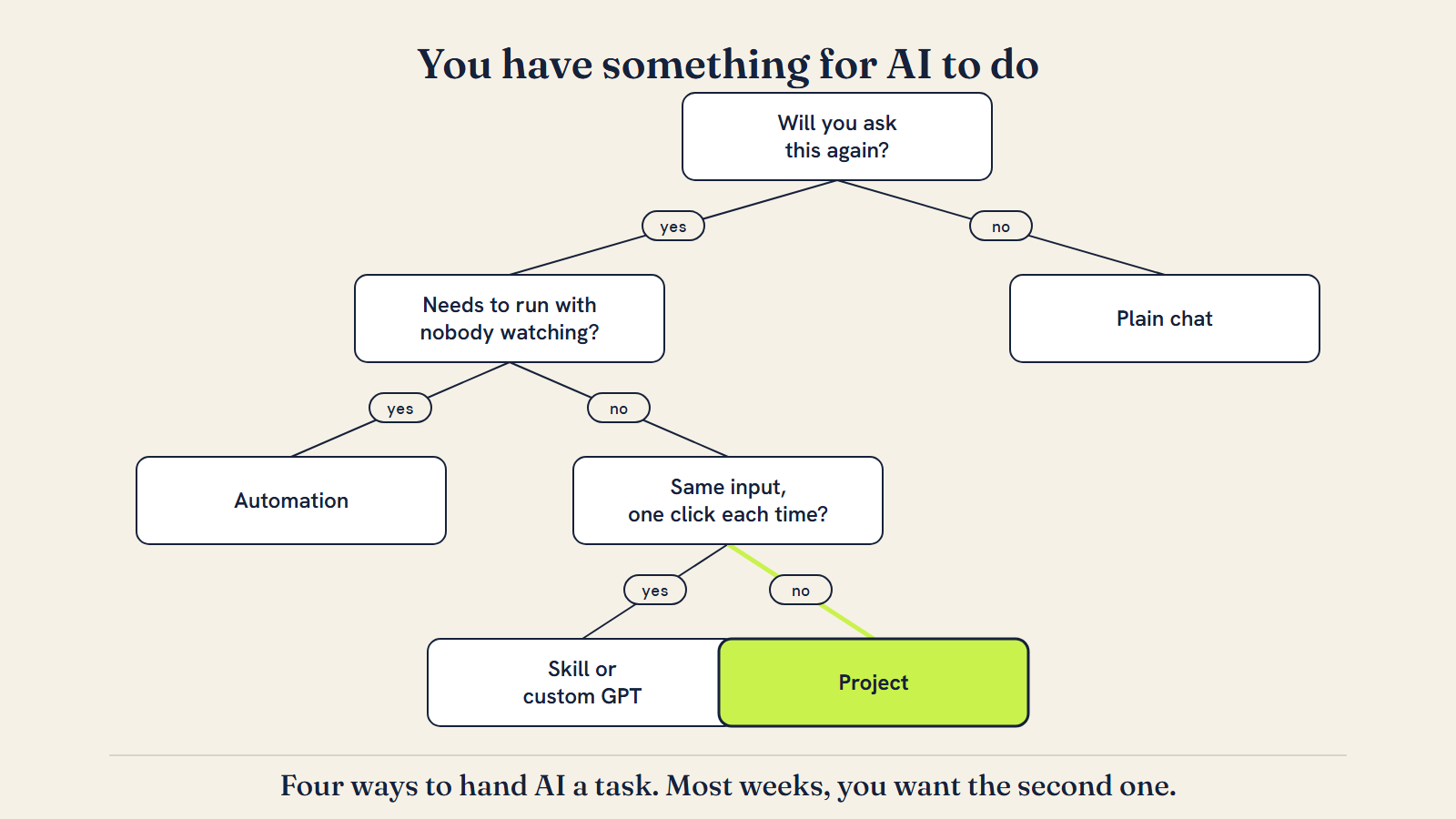
There are four ways to hand AI a task, and most one-person businesses only ever use the first one: a plain chat, retyped from scratch each time. The other three exist specifically to stop that.
A ChatGPT Project is a workspace that groups chats, files, and instructions together. Its memory is a per-project setting: turn on "project-only memory" and that project's context stays out of your other chats; leave the default setting on and the project can still draw on your wider chat history too, so the isolation is something you switch on, not something that happens automatically (OpenAI, "Using projects in ChatGPT," checked 18 Sep 2026). A Claude Project does the same grouping job under a different name: you upload documents to the project's knowledge base and write project instructions once, and every new chat inside it already has that context — and here the separation is automatic, since each Claude Project keeps its own isolated memory by default. Your bookkeeping project shouldn't know what your design clients said, and vice versa — reliably in Claude, and in ChatGPT once you've switched project-only memory on.
A custom GPT looks similar — a fixed persona with instructions and files attached — but it's built for a single repeatable task, not an evolving body of background knowledge, and it has no persistent memory of what happened in last Tuesday's run by the time you open it on Thursday (OpenAI, Creating and editing GPTs). OpenAI is retiring custom GPTs in favor of a new Plugins system: as of September 2026, personal ChatGPT accounts (Free, Go, Plus, Pro) can no longer create new ones, though GPTs you already built keep running for now, and Business, Enterprise and Edu workspaces can still create them until the wider retirement later in 2026 (same source, checked 18 Sep 2026). Claude's equivalent, Skills — folders of instructions Claude loads on demand, launched in October 2025 and available on Pro, Max, Team and Enterprise — work the same way: portable, stackable, one task each. Module 2 turns an OS task into exactly that. This module is about the workspace underneath it: the Project.
The decision rule is simple. If you'll ask this kind of question more than a couple of times a month, and the facts behind it (your rates, your client list, your voice) don't change often, put those facts in a Project. If it's one fixed input-to-output task you want to run in one click, that's a Skill, or a saved prompt in a Project — Module 2. If it needs to happen without you opening a chat at all, that's automation — Module 3. This module is the foundation the other two sit on: without a Project holding your real facts, a Skill still has to ask you to paste them in every time.
Isolation is the feature worth naming, because it's the part people worry about before they've tried it. If you paste a client's confidential brief into your bookkeeping project by mistake, nothing in your other projects' chats will surface it later — the separation runs in both directions, keeping stray context out as reliably as it keeps deliberate context in. (In ChatGPT, that guarantee depends on the project's memory setting actually being "project-only" — check it, since the default lets your wider chat history in too.) That's a different, more visible kind of memory than the general "remembers things about you" setting some chat tools offer, which learns facts across every conversation whether you meant it to or not. A Project's knowledge base is scoped and inspectable: you can see exactly which files it's drawing from at any time, and remove one the day it goes stale, the way Elin's rate sheet gets replaced the day her prices change rather than patched over in a chat nobody reopens.
Worked example
Elin Saar is a fictional one-person brand-and-web designer in Tallinn, used here so the documents and numbers are concrete instead of hypothetical. She works mostly with small hospitality and food businesses.
Here is her actual rate sheet, the first file she'd upload:
ELIN SAAR — RATE SHEET (internal, last updated 2 Sep 2026)

Day rate: €480/day (branding + web design)
Logo + basic brand sheet: €900, 2-week turnaround
Full brand identity (logo, colours, type, 1-page guide): €1,800, 3-week turnaround
5-page website (Webflow, no e-commerce): €2,400, 4-week turnaround
5-page website + booking or shop integration: €3,200, 5-week turnaround
Monthly retainer (small updates, up to 4 hours/month): €320/month, 3-month minimum

Standard terms: 40% deposit, balance on delivery. Two rounds of revisions included, third
round billed at €60/hour. Do not discount below €1,600 for a full identity, ever.
And her second file, a short client history:
CLIENT HISTORY — SHORT VERSION (last updated 2 Sep 2026)

Vihma Coffee (Tallinn, 2 locations) — full brand identity + 5-page site, Feb 2026. Owner cared most about a logo that still worked as a tiny to-go cup sticker. Referred one client since (Kai's Deli, below).

Kai's Deli (Tallinn) — logo + brand sheet only, tight €900 budget. Wanted "nothing twee." Slow to send content, so a site was never offered.

Nord Sauna Co (Pärnu, mobile sauna rental) — 5-page site + booking integration, Nov 2025. First project needing a booking calendar; took 10 extra days because their calendar tool (Fresha) needed API access requested mid-project instead of on day one.

Pattern: hospitality and small food/drink clients refer well. On any booking-calendar project, confirm the client's calendar tool and request API access before quoting a date.
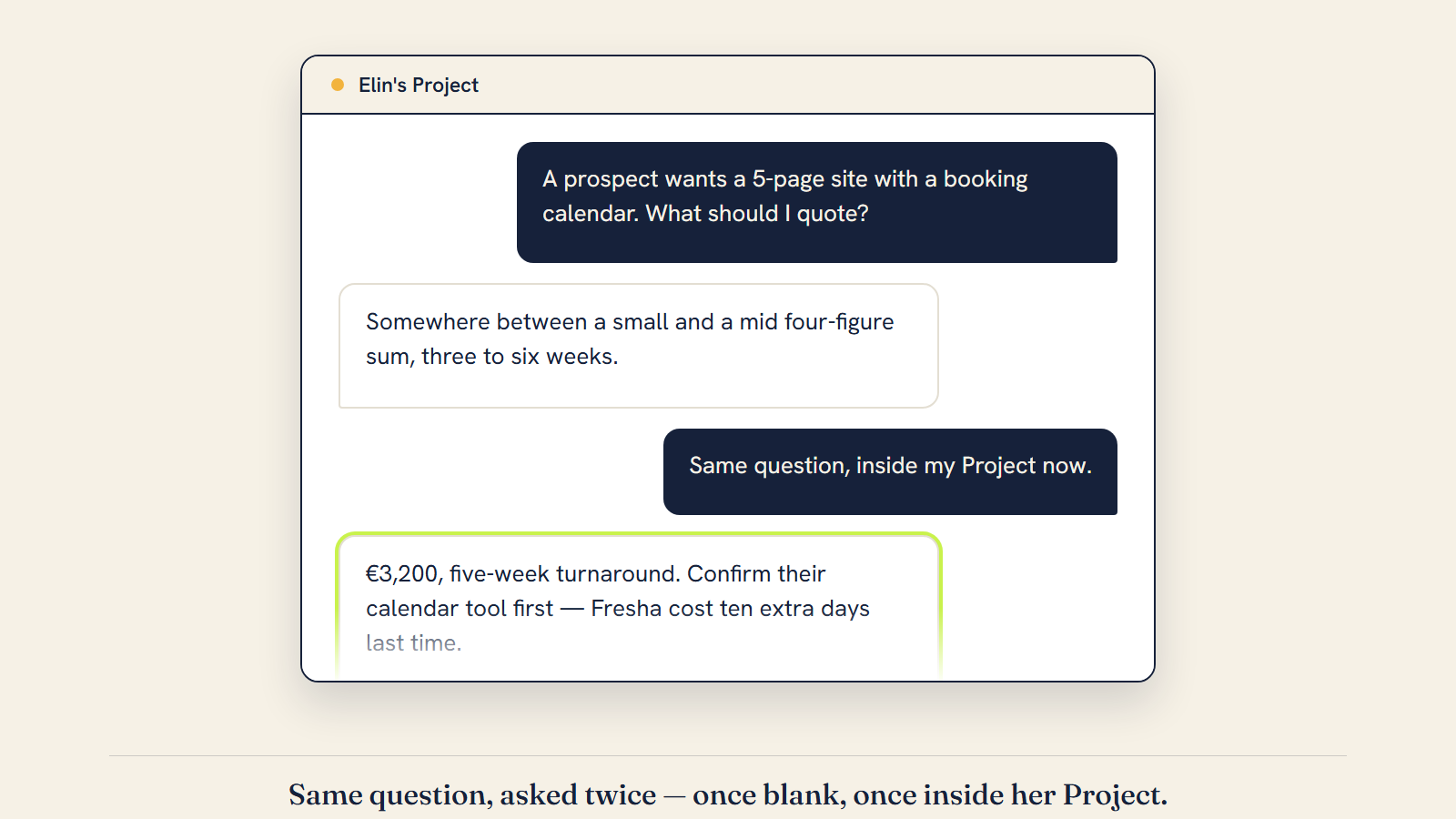
Before — a fresh chat, no project, asked a real question:
"A prospect wants a 5-page site with a booking calendar. What should I quote and how long will it take?"
A generic answer comes back: it depends on scope, but similar projects often run somewhere between a small and a mid four-figure sum and take three to six weeks; you'd want to clarify requirements like the number of pages, the platform, and whether payments are involved. True, and useless — it knows nothing about Elin.
After — the identical question, asked inside a Claude Project with those two files loaded as project knowledge and one line of project instructions ("I run a one-person brand and web design business; use the rate sheet and client history in this project before asking me to repeat anything that's already there"):
Based on your rate sheet, a 5-page site with booking integration is €3,200 at a five-week turnaround. Given your Nord Sauna Co history, confirm their calendar tool before quoting the date — Fresha needed an API-access workaround last time and cost you ten extra days. If they're not on Fresha, the five-week timeline holds; if they are, request API access on day one, not partway through.
Same tool, same question, ten seconds of typing either way. One answer is a paragraph you could have written yourself; the other one uses her actual price, her actual past client, and a specific lesson she'd otherwise have to remember to apply on her own. This before/after comparison was produced with Claude on 18 Sep 2026.
Do this now
- Open a new Project in Claude or ChatGPT and name it after your business, not "Untitled".
- Write one paragraph of project instructions: what you do, who you serve, your tone.
- Upload your real rate sheet as a file in the project's knowledge base — rough is fine, invented is not.
- Upload one client history file, even three bullets per past client (what, when, one lesson).
- Ask the project a real question you'd normally re-paste context for, and check whether the answer used your actual numbers.
- If you use both Claude and ChatGPT, repeat the setup in your second tool so you're not locked into one.
PROJECT SETUP CHECKLIST

Project name: [YOUR BUSINESS NAME, not "Untitled"]

Project instructions (paste as a starting point, then edit):
"I run a one-person [YOUR BUSINESS TYPE] business called [NAME]. I work with [WHO YOU SERVE].
My tone with clients is [TONE, e.g. warm but direct]. Use the rate sheet and client history in
this project's files before asking me to repeat information that's already there."

Files to upload, in this order:
[ ] Rate sheet or pricing (even rough)
[ ] Client history (even 3 bullets per client: what, when, one lesson)
[ ] Your offer sentence, once you've run Task 01, Offer Sharpener, in the AI Business OS (included in the AI Business OS, $27)
[ ] One past proposal or contract, as a style reference

Test question to ask right after setup:
"[A REAL QUESTION YOU'D NORMALLY RETYPE CONTEXT FOR]"
Check: did the answer use your actual numbers or clients without you repeating them?
Check
- I have one named Project (not "Untitled") in at least one AI tool.
- My real rate sheet is uploaded as a file, not retyped from memory each time.
- At least one client history file is uploaded.
- I wrote project instructions in my own voice, not left the default blank.
- I asked a real question and the answer referenced my actual numbers or clients.
- I can explain, in one sentence, the difference between this Project and a Skill, or a saved prompt in a Project (Module 2).
If you are stuck
The most common failure is uploading something huge and stale instead of something short and current — a full inbox export instead of a one-page rate sheet. The AI can usually still find what it needs, but slower and noisier, and you'll trust the answers less. Build one clean file first; add more later. The second failure is writing project instructions once and never touching them again as prices change. Put a "last updated" line on the file itself, the way Elin's rate sheet does, so a stale number is visible the moment you open it, not three months into quoting off it.
Sources
Unlocked